BigCommerce Integration Guide
Enhancing your BigCommerce storefront with Sienna is a seamless process using the built-in Script Manager. Follow these granular steps for a perfect deployment.
Step-by-Step Instructions
1. Open Your BigCommerce Dashboard
Log in to your BigCommerce Control Panel.
2. Navigate to Script Manager
From the left navigation menu, go to Storefront and select Script Manager.
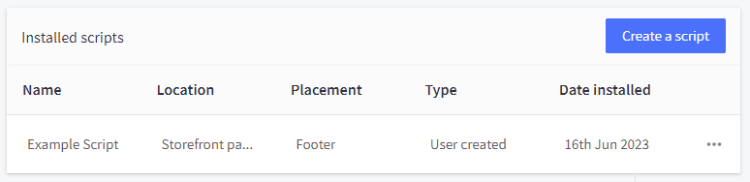
3. Create a New Script
Click the Create a Script button.
4. Input Your Script Details
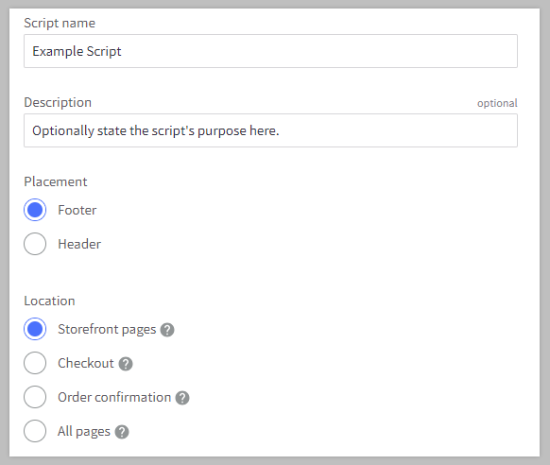
Fill in the following fields in the modal:
- Name of Script: Set this to
Sienna Accessibility. - Description: Detailed step-by-step guide to installing the Sienna accessibility widget on your BigCommerce storefront.
- Location on Page: Select Head for optimal performance.
- Select Pages where script will be added: Choose All Pages.
- Script Category: Select Essential or Functional.
- Script Type: Select Script.
5. Paste Your Sienna Script
Paste your Sienna installation script into the Script contents box.
6. Save and Verify
Click Save. Navigate to your storefront (public site) to verify that the Sienna widget is active.
Troubleshooting Common Issues
- Widget Not Appearing? Ensure that the script is enabled in the Script Manager list. Some themes (especially non-Stencil ones) may require manual installation in the theme’s HTML files.
- Conflict with Checkout? If the widget interferes with your checkout process, you can exclude specific pages in the Script Manager’s Select Pages option.
- Script Type Error? Make sure you selected Script and not a specific third-party script manager provided by BigCommerce.
Need Help?
If you’re having trouble with the installation, our team is here to help. Contact our support team for assistance with your BigCommerce integration.